RetailMind CS5224 Cloud Computing
Last updated: Apr 19, 2026
Tools: aws · bedrock · cdk
RetailMind is a no-code ML platform aimed at small retail businesses that don’t have a data scientist on payroll. The flow is: open the app, describe your business problem in a chatbot (“I want to know which customers are about to stop buying”), upload a CSV or pick a preloaded Kaggle dataset, get a trained model and a set of plain-English recommendations. AutoML handles the model selection. Bedrock Claude handles the chat and the recommendation summaries. The whole thing runs on twelve AWS services in ap-southeast-1, fully serverless, scales to zero when no one is using it, and costs roughly five to twelve dollars a month at demo scale.
This was the CS5224 (Cloud Computing) project at NUS. Six MSBA students. I was the sole engineer. The other five ran competitor analysis, the user study, the pitch, and QA. Four weeks of build.
What it does
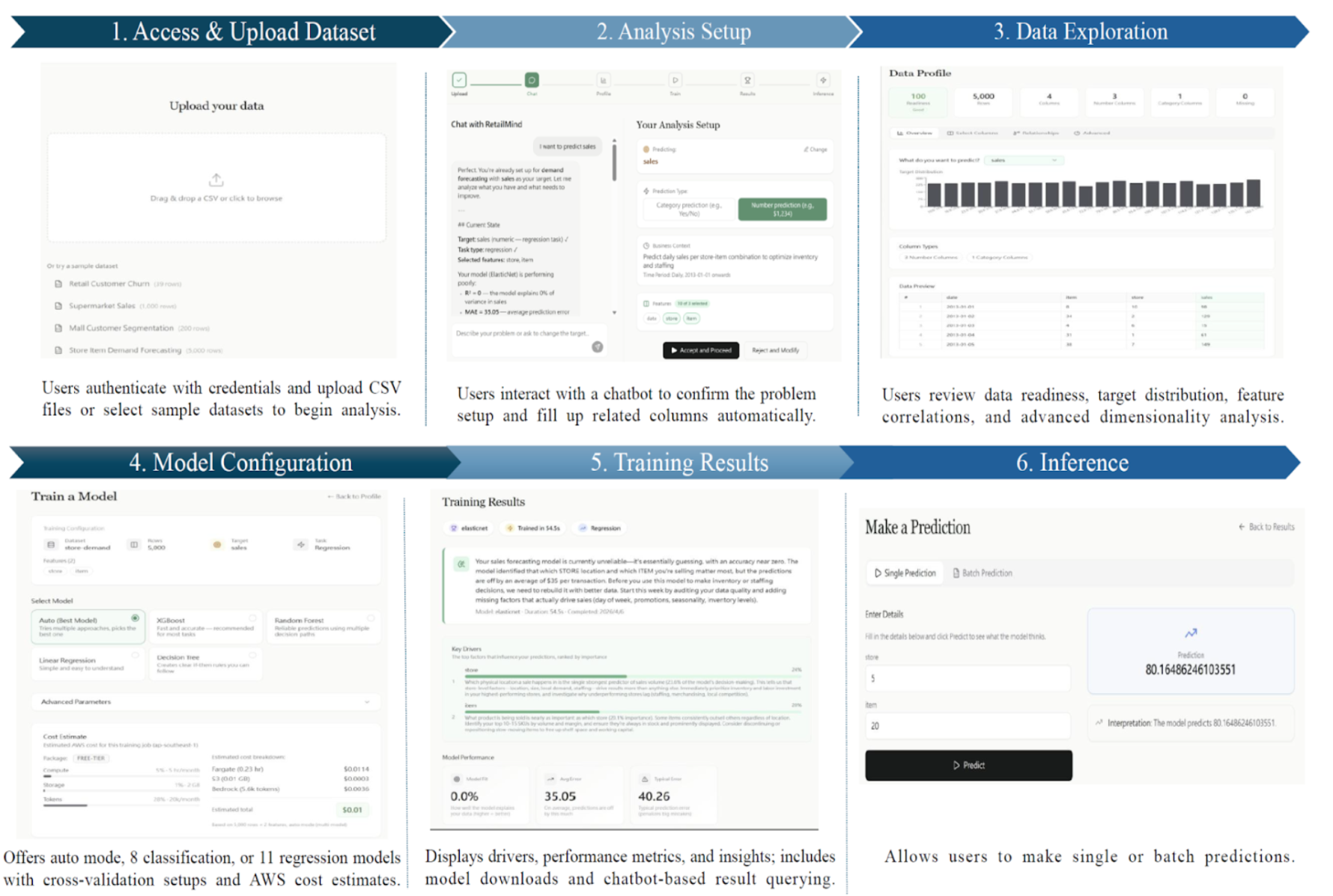
A retail SME owner opens the app and walks through six steps:
- Upload data, or pick from four preloaded retail Kaggle datasets (churn, demand, segmentation, sales).
- Set up the analysis by chatting with an assistant. The assistant suggests use case, task type, target column, and useful features. The user can accept or tweak.
- Explore the data: distributions, null rates, type checks, correlations, target balance.
- Configure the model. Auto mode picks candidates and runs cross-validation. Advanced mode lets you override.
- Read the results: metrics, feature importance, and a Bedrock-written summary.
- Run predictions on new data through a tabular form generated from the trained model’s features.
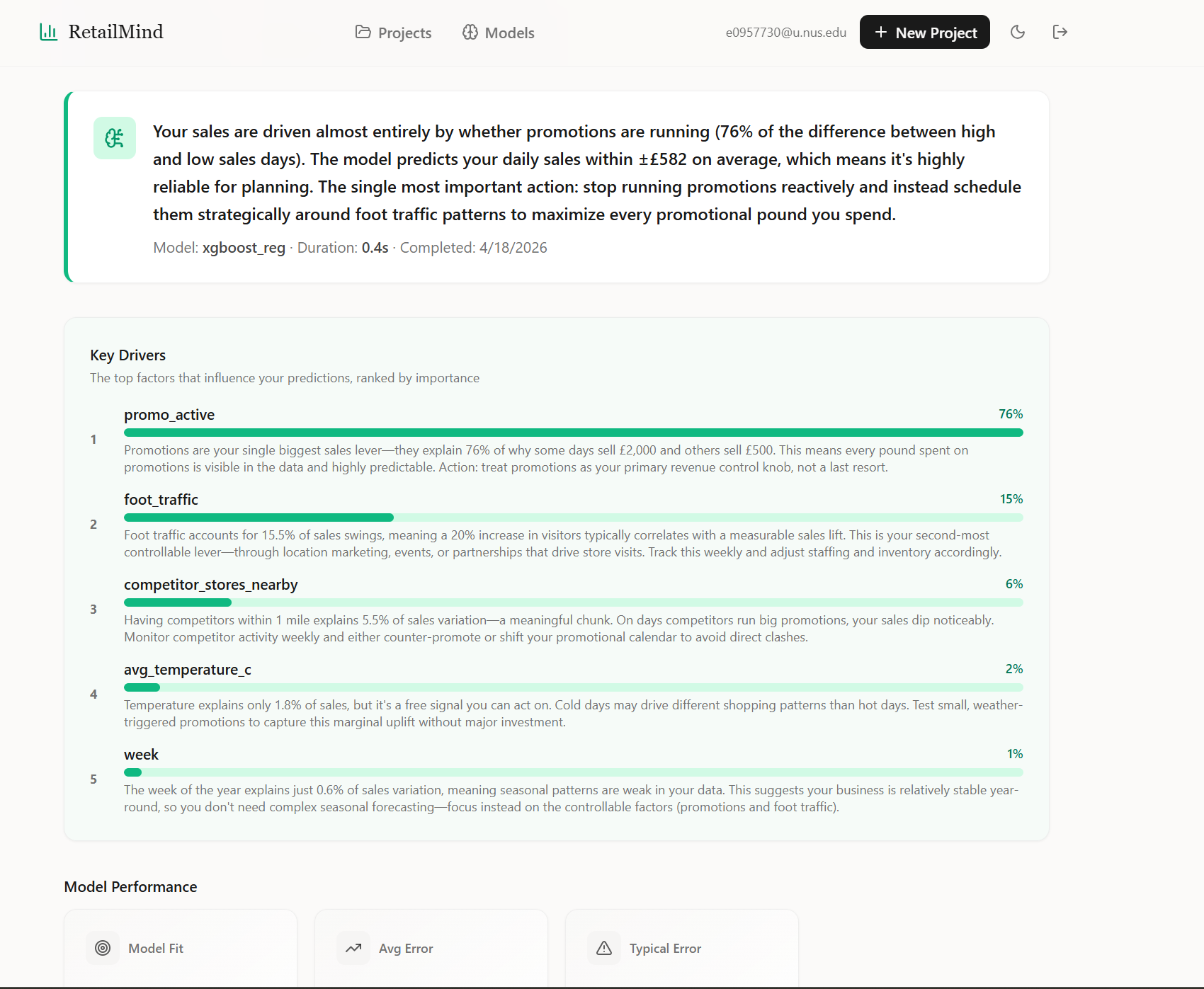
The Bedrock summary is generated per model run, grounded on the actual feature importance and metrics, so it surfaces real drivers (“promo activity explains 76% of the variance, schedule it reactively to foot traffic instead of running constantly”) rather than generic ML speak.
How it works
Twelve AWS services, seven CDK stacks, sixteen Lambdas, seventeen API routes, nineteen ML models in one container. The architecture is event-driven and serverless-first, deployed entirely in Singapore region for data residency.
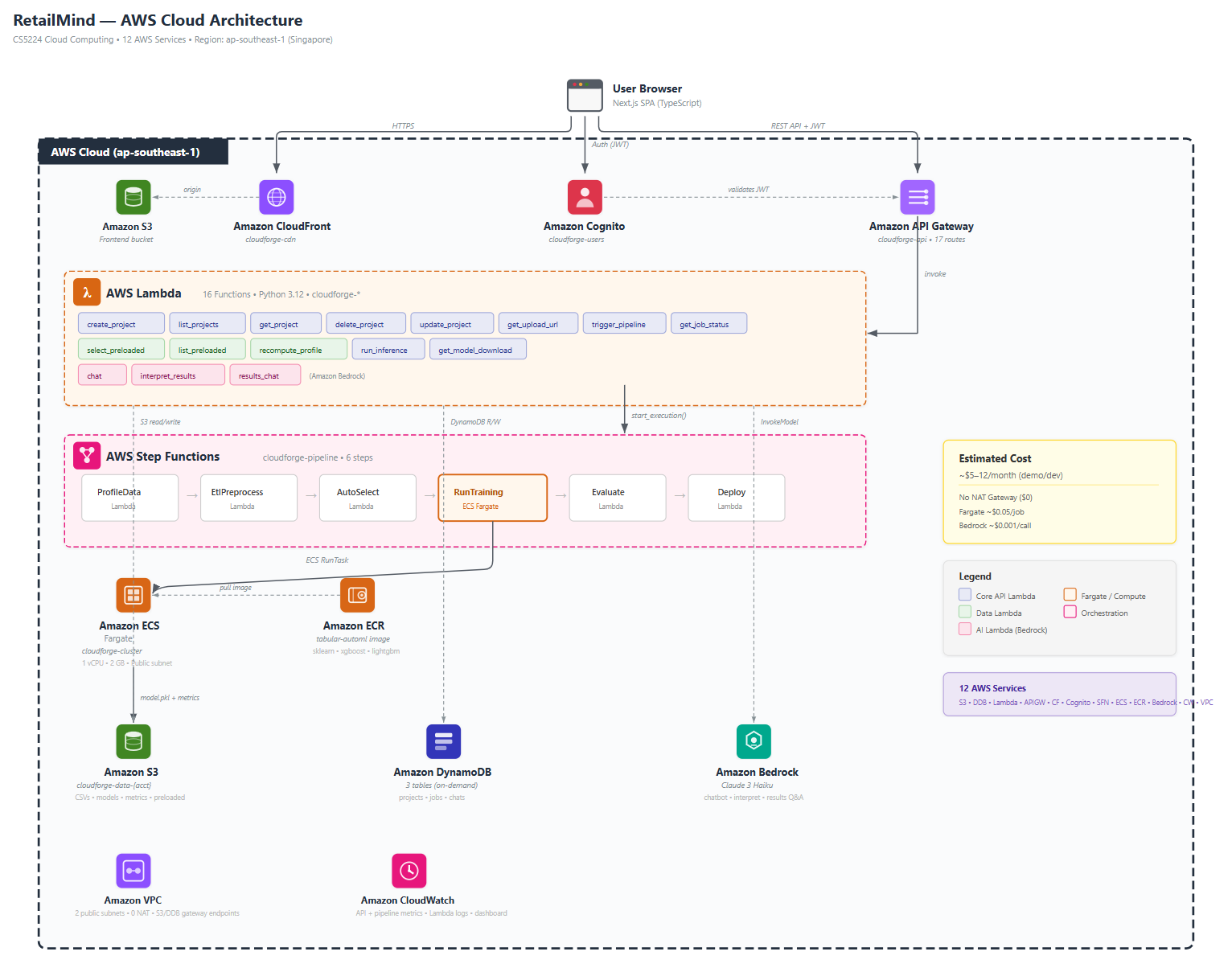
The whole system is intentionally split into two pipelines:
API path. CloudFront serves the Next.js frontend. API Gateway with a Cognito JWT authorizer fronts sixteen Lambdas (Python 3.12, shared sklearn layer) that read and write DynamoDB and S3. Bedrock (Claude 3 Haiku) handles the chat, the post-training summary, and the follow-up Q&A. About $0.0005 per chat turn.
Training path. Click Train, a Lambda kicks off a Step Functions state machine: profile, ETL, auto-select, train (Fargate, pulled from ECR), evaluate, deploy. Status writes to DynamoDB at each step so the frontend can poll. Step Functions catches failures and writes them back as FAILED with the reason.
Why two paths: Lambda’s 15-minute cap plus its 250 MB package limit can’t hold a sklearn + xgboost + lightgbm + pandas dependency stack running cross-validation across nineteen models. Fargate has neither limit. So the API stays cheap on Lambda, the training jumps to Fargate when triggered.
The cloud reasoning, and the things I deliberately skipped
The lazy-mode version of this project would have been: spin up an EC2, install Postgres, FastAPI, Streamlit, scikit-learn, run it as one server. Done in a weekend. We rejected it for being too easy. The point of the module was to actually use AWS, not cosplay it.
So we picked the harder path on purpose:
- No NAT Gateway. Fargate runs in two public subnets across AZs with public IPs assigned at task launch. We use VPC endpoints for S3 and DynamoDB so traffic to those services never leaves the VPC. This saves about $33 a month versus the standard “private subnet plus NAT” pattern, which would have been more than the rest of the bill combined. Production would use private subnets, but for a demo it was a deliberate cost call.
- No ALB. All HTTP goes through API Gateway and Lambda. Fargate is invoked by Step Functions, not by HTTP, so there’s nothing to load-balance.
- No SQS. The pipeline is sequential (profile then ETL then train then evaluate then deploy). Step Functions does this natively. SQS is for fan-out and worker pools, which we don’t need.
- No persistent inference endpoint. Inference is a Lambda that downloads the pickled model from S3 on each call. Cold start is about three to five seconds. Fine for a demo, and it scales to zero between predictions.
- CDK over the AWS Console. Seven stacks: storage, auth, network, API, pipeline, frontend, monitoring. One
cdk deploy --allfrom a fresh account brings the whole thing up. The deploy story matters because the alternative is clicking through the console, which is unrepeatable and silently undocumented.
We also tried SageMaker for the training side and decided to build from scratch in Fargate instead, because the point of the course wasn’t to learn how to call a managed service; it was to build the training infrastructure. Kubernetes was discussed and skipped: the workload is short-lived batch jobs, not long-running services, so EKS would have added complexity without buying us anything.
The AutoML container, honest version
The README says nineteen models. The reality, after running it on a bunch of test datasets, is that AutoML almost always lands on XGBoost or LightGBM for tabular data, with Logistic Regression or Random Forest sometimes winning on small or weirdly-shaped datasets. The smaller models do win occasionally, which is why we keep them in the candidate pool, but “we built nineteen models” is a misleading number; the more accurate version is “we built one container that can train any of nineteen models, runs cross-validation across the relevant subset, and surfaces a leaderboard.”
The Model Library page exposes the catalog to the user, with complexity, training speed, interpretability, and rough cost-per-run on each card so non-technical users can override Auto mode if they want. Auto mode is the recommended default, and the page also shows a dataset-size estimator that reflects the candidate-pruning rules (SVM and KNN drop out above ten thousand rows, ensembles drop out below a few hundred).
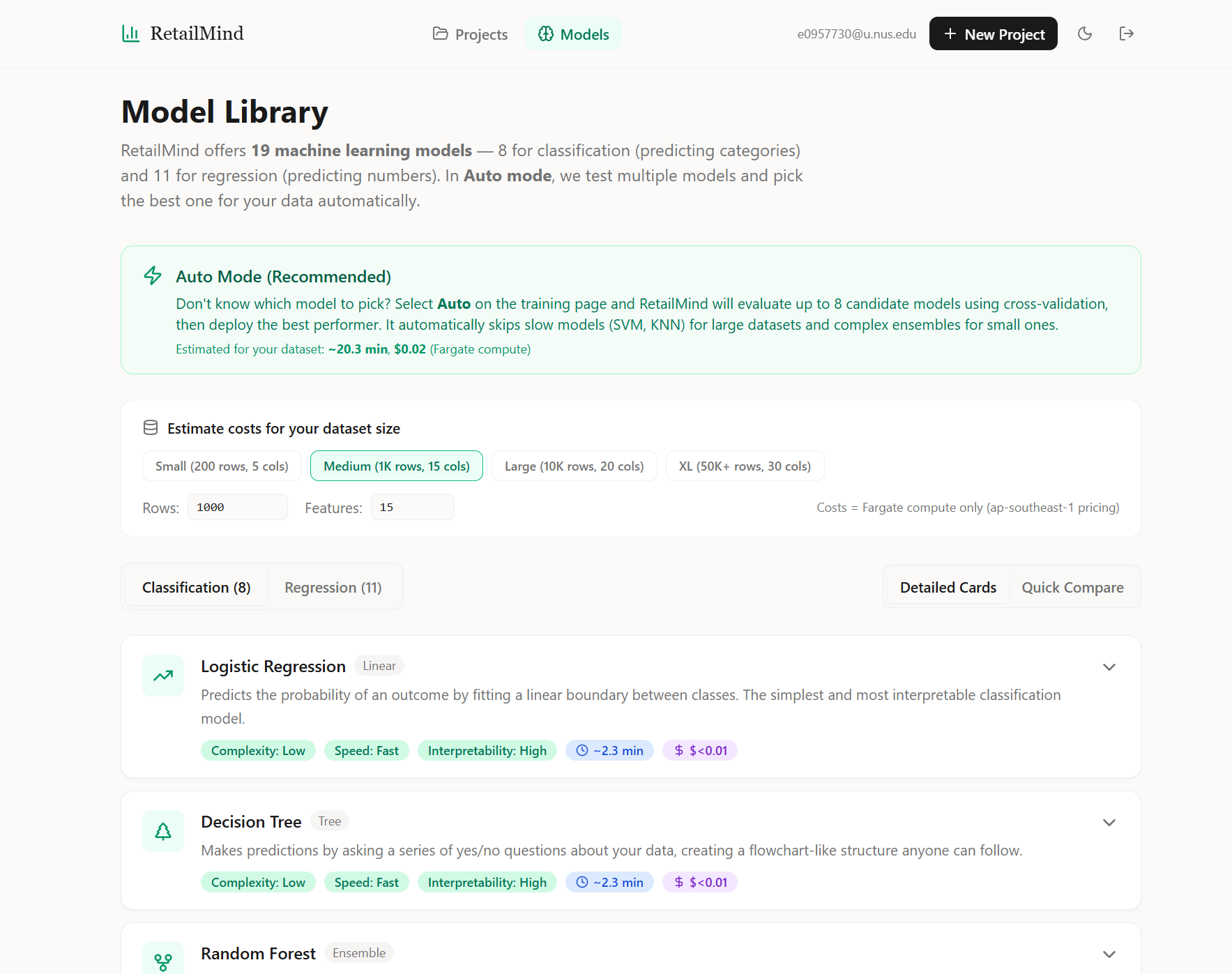
The container caps a few things to keep Fargate runs bounded:
MAX_CANDIDATES = 8per job (down from the catalog of nineteen).RandomizedSearchCVwithn_iter = min(6, grid_size)per model, and the random search is only triggered when the dataset is under fifty thousand rows. Above that we just.fit()with default hyperparameters because the search would dominate the runtime.cv_folds = 5for the main scoring, dropped to three for the random search.- Auto-select prunes the candidate set by dataset size: SVM and KNN get dropped above ten thousand rows because their training time scales badly.
Each Fargate run is one vCPU and 2 GB RAM, costs about $0.05, and takes one to five minutes for the demo datasets. The leaderboard JSON is uploaded to S3 alongside the winning model, so users can see what was tried and what came close.
What was hard
The hardest thing about building this was not the ML and not the architecture. It was the loop: deploy, something fails silently in a Lambda or a Fargate task, hunt through CloudWatch to find the actual error, fix the code, redeploy, fail in a new place. Coming from a non-CS background, I had no mental model for “where do I look when this breaks?” The console UI is fragmented across services; an error in a Step Functions state machine might surface in CloudWatch Logs under a Lambda log group, or as a Fargate task event in ECS, or as a generic States.TaskFailed (the AWS equivalent of “something broke somewhere, good luck”). Half my four weeks was just learning where AWS hides the actual error message when something breaks. CloudWatch is a maze.
Things I’d specifically flag for next time:
- IAM permissions are not your friend. The amount of times a Lambda told me
AccessDeniedfor a permission I swear I granted three deploys ago is genuinely humbling. The fix is usually obvious in retrospect (forgot to grant the Lambda’s role permission to call the next service). Lesson: least-privilege is the right default but it costs iteration time. Grant generously while iterating, tighten before submission. - Step Functions debugging is its own skill. The execution graph is great when it works. When it fails, you need to drill into the failed state, find the input, copy the JSON, paste it into a Lambda test event, and run it locally to see the real error. There’s no faster path I found.
- Frontend env-var dance. The CDK deploys API Gateway and Cognito and outputs their IDs. The frontend needs those IDs at build time. So the deploy is: deploy infra, grab outputs, write
.env.local, rebuild frontend, redeploy frontend stack. Annoying, but I never automated it because the project was four weeks and I was solo.
Scalability
Stress-tested the static frontend and the API at one, ten, twenty-five, fifty, and a hundred concurrent requests. Each level fired fifty requests.
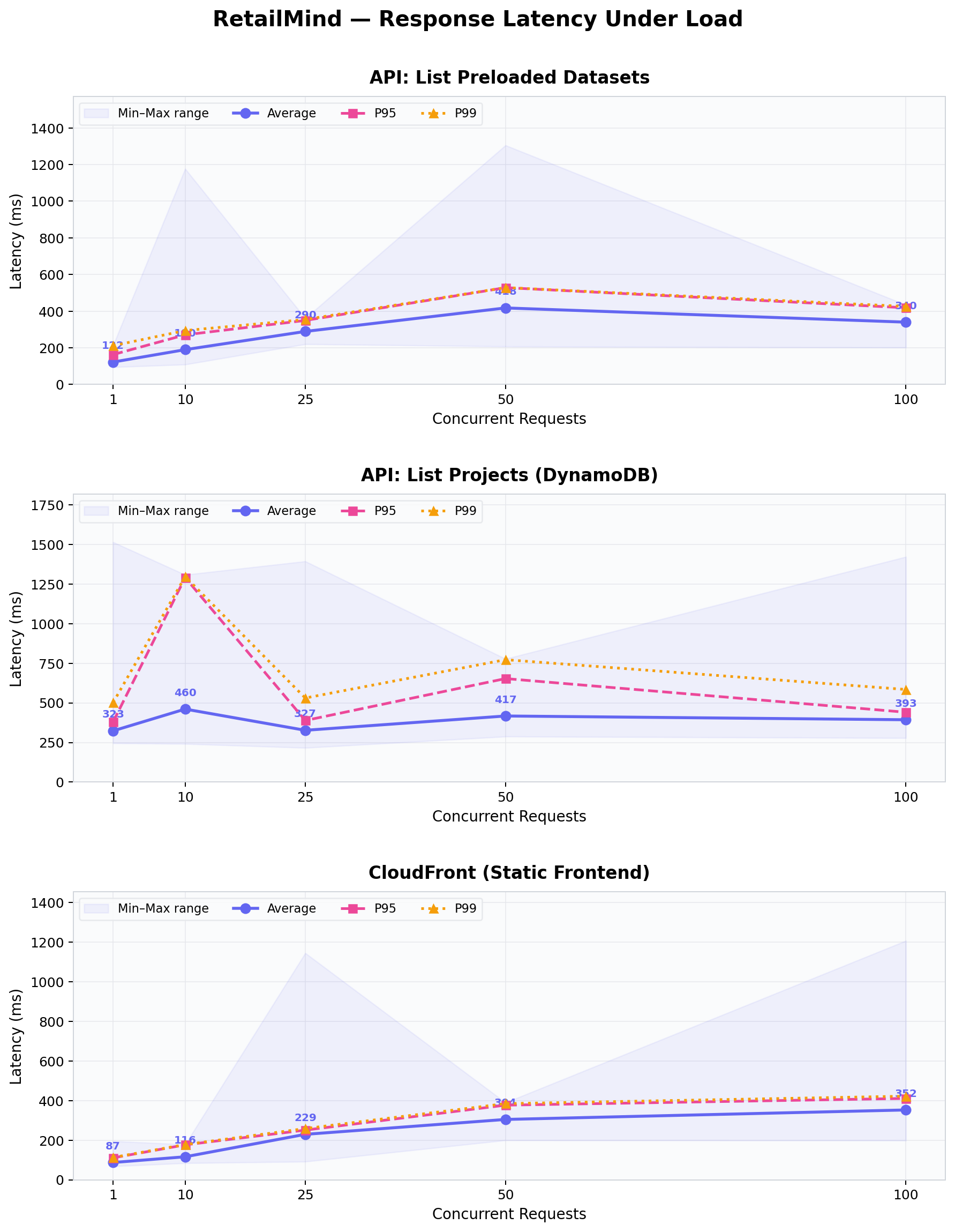
CloudFront held up perfectly. 100% success at every concurrency level. Latency scaled smoothly from 87ms at one concurrent to 352ms at one hundred. This is what you’d expect from edge caching: the CDN absorbs the load.
The lightweight ListPreloadedDatasets API stayed under 420ms even at one hundred concurrent. The heavier ListProjects API (which queries DynamoDB) started throttling at fifty-plus concurrent. After investigating, this turned out to be Lambda’s default reserved concurrency limit on our demo account, not a design problem. In production you’d raise the reserved-concurrency limit on the function and it would scale further. I logged this honestly in the report rather than tuning around it for a cleaner chart.
Cold starts are negligible in practice. The first call to /preloaded-datasets came in at 125ms; warm calls averaged about 96 to 142ms. So the cold-start premium is roughly 30 to 50ms, which is invisible to users.
Security
Seventeen security tests across three categories: authentication, cross-tenant data isolation, and input validation.
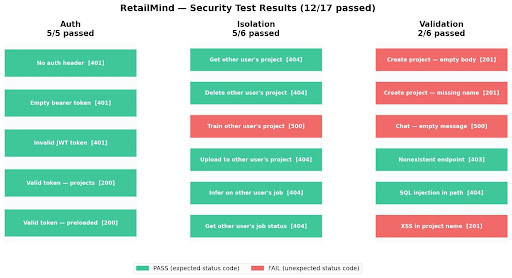
Auth: 5 of 5. Every request without a valid Cognito JWT is rejected at the API Gateway authorizer, before any Lambda runs.
Isolation: 5 of 6. Users cannot read, delete, upload to, infer from, or check status on projects belonging to other users. The pattern is strict: every Lambda builds S3 paths and DynamoDB queries from userId extracted from the verified JWT, never from the request body. The one fail (Train other user's project) returned 500 instead of 403. The training Lambda blew up on a malformed body before reaching the authorization check; the unauthorized user still couldn’t actually train, so the security guarantee held, but the error code was wrong. This is a bug to fix, not a hole.
Validation: 2 of 6. The four fails are cosmetic, not exploitable. Empty-body POSTs to /projects create harmless Untitled projects (because the Lambda fills in defaults), <script> tags in project names get stored verbatim but React’s automatic output escaping neutralizes them on render, and an empty chat message gets passed to Bedrock which returns a 500. None of these let an attacker do anything they couldn’t otherwise do, but they’re sloppy and would be the first thing to fix before a real launch.
SQL injection in URL paths: pass. DynamoDB has no SQL layer, and a bad project ID just resolves to a 404.
Cost
| Service | Monthly cost |
|---|---|
| S3, CloudFront, Cognito, API Gateway, Lambda, DynamoDB, Step Functions, ECR, EventBridge, CloudWatch | Free tier |
| VPC (no NAT Gateway, public subnets, S3 + DynamoDB endpoints) | $0 |
| Fargate (~50 training jobs at $0.05) | ~$2.50 |
| Bedrock Claude Haiku (~200 chat and recommendation calls) | ~$0.20 |
| Total | $5 to $12 a month |
This is the receipt for the design. If we’d taken the EC2 shortcut, we’d be paying for a t3.medium ($30+) plus an RDS instance ($15+) plus an ALB ($16+) twenty-four hours a day, whether anyone was using the app or not. Picking serverless on purpose, with a few specific cost calls (no NAT, no ALB, no persistent inference), is what makes a five-user demo cost less than a coffee.
Outcome and what I’d change
Submitted on time. Live deployment ran on the demo URL above (will be torn down soon).
What I’d change with more time:
- Tighten input validation. The four cosmetic-fail tests in the security suite all want a proper Pydantic-style request schema on each Lambda. Should be a one-day cleanup.
- Multi-region. Currently anchored to
ap-southeast-1for Singapore data residency. A second region would cut latency for users elsewhere while keeping local compliance. - Migrate the heavy training to EC2 if usage grew. Fargate is the right answer for unpredictable, low-volume workloads. Once you know your training load is sustained, EC2 spot fleets with autoscaling get cheaper per training-minute. We’d need real metrics first.
- Try Kubernetes. I skipped EKS because the workload didn’t warrant it, but the orchestration surface area is something I want to learn separately. Probably as a side project.
What this taught me
Before this course, my mental model for “deploy an app” was: get a computer, install Postgres on it, install Python on it, run a server. That’s it. I knew “the cloud” in the abstract, in the way you know “blockchain” exists, but I had never written infrastructure-as-code, never spun up a Lambda, didn’t know what a VPC was for, and would have told you with a straight face that scaling means buying a bigger computer.
The single biggest thing this course taught me was the difference between always-on and event-driven. In the buy-a-computer model, your server is sitting there twenty-four hours a day, drawing power, charging you whether anyone uses it or not. In the event-driven model, nothing runs unless something triggers it. Nobody clicks anything for an hour, you pay zero. A thousand people show up at once, AWS spins up a thousand parallel Lambdas. This sounds obvious written down. It was not obvious in my head before the course.
Infrastructure is a design problem, not a logistics problem. The choice between EC2 and Lambda is not a deployment detail; it’s a choice about how the system behaves under load, what costs look like, and what happens when no one is using it. I will never have the engineering depth of someone who has been writing code since they were fourteen, but I now know what serverless is for, what it costs, where it breaks, and how to argue for it in a room of people who don’t. Worth the four weeks of CloudWatch hell.
Built with five teammates from the NUS MSBA cohort.